Rabu, 26 November 2014

How to Copy Locked Site

If you ever come across a website or blog can not right click or on the block to be copied article, blog or web may have been locked by the owner.

It is possible to avoid plagiarism, piracy or prevent people from copying and pasting (copy and paste) the work that he made, but if you really really want to copy it in order for the purpose of learning or the learning task you and not for piracy. (however, we have to respect other people's work as well as fruit thoughts), you'll want to also copy it to the benefit of your learning.

Here's another way to copy a site that is locked, if it can not right click on the block or by disabling javascript.

The steps are as follows:
1. Go to a blog or website that will take the title of the article and go to the article on the web address that will be copied.
2. Then block the site and copy the URL address of the site address



3. Then open Microsoft Word 2007 or Word 2010

4. Once it opens a new window Ms. Word, click the Office button and then Open (the 2007 version) or click File and then Open (the 2010 version) or press Ctrl + O.
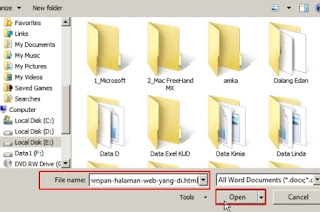


5. In the File name copy the link that has been copied and press Open, and wait a few moments, then the web page will be moved to the word application, then you only edit or omit some parts that you do not need ....

Hopefully this way for the benefit and not for the purposes of learning and teaching that is negative! ...

Good luck ...

Cara Copy Situs Yang Terkunci

Jika Anda pernah menjumpai sebuah situs web atau blog tidak dapat di klik kanan atau di blok untuk di copy artikelnya, mungkin web atau blog tersebut telah dikunci oleh pemiliknya. 

Hal ini dimungkinkan untuk menghindari penjiplakan, pembajakan atau agar orang lain tidak mengcopy paste (kopas) karya yang dia buat, tapi jika Anda memang betul-betul ingin menyalinnya dalam rangka untuk tujuan pembelajaran atau tugas belajar Anda dan bukan untuk kepentingan pembajakan. (bagaimanapun juga kita harus menghormati juga karya orang lain sebagai buah pemikirannya), Anda tentu ingin juga menyalinnya untuk kepentingan belajar Anda.

Berikut cara lain untuk mengcopy sebuah situs yang terkunci, jika memang tidak bisa di klik kanan, di blok atau dengan cara menon-aktifkan javascriptnya.

Langkahnya sebagai berikut:
1. Buka blog atau situs yang akan diambil artikelnya dan masuklah ke judul artikel pada alamat web yang akan di copy.
2. Lalu blok alamat URL situs dan copy alamat situs tersebut


3. Setelah itu buka aplikasi Microsoft Word 2007 maupun Word 2010

4. Setelah terbuka jendela baru Ms. Word, klik Office button lalu Open (pada versi 2007) atau klik File lalu Open (pada versi 2010) atau tekan Ctrl + O.


5. Pada File name copykan link yang telah dicopy dan tekan Open, dan tunggu beberapa saat, maka halaman web tersebut akan pindah ke aplikasi word, selanjutnya Anda tinggal mengedit atau menghilangkan beberapa bagian yang menurut Anda tidak perlu….

Semoga cara ini untuk kepentingan dan keperluan pembelajaran dan bukan untuk mengajarkan yang bersifat negatif!...

Selamat mencoba...

sumber

Copy Tricks That article Wearing Anti Copy Paste Scripts

I saw a lot of blogs that install script copy and paste. Maybe they do not want the destination in a copy of their article without permission in other blogs. They put a lot of scripts that do not allow right-click, select, or even disable the view-source their blog. I never felt the difficulty and annoyance when you want to save an image directly with right click save as, open a link to a new tab using right click open new tab. I mumbled a little "Ribet Huhhh Ko script does use anti Copas all, do so can not open a new tab link etc. Kayak cave going to copy and paste the article lu wrote ". But I think maybe they want to protect them from copaser article evil. Then copy and paste the script ampuhkan?

I will explain a little bit of my opinion when visiting a blog that has anti copy and paste the script. If the blog does not allow just right click, I can just select all first, then I copy the shortcut CTRL + C for Windows and Command + C for Mac. If the blog is not mengijinjan select all with the mouse, I see the source code palingan CTRL + U / Command + U (Mozilla Firefox) or use the shortcut CTRL + A for Windows and Command A for Mac. Then when in Paste in Notepad, I took part article: D.

If the shortcut is also in nonaktifin how? I open the source code by adding the view-source: (Mozilla Firefox) before her blog address. For example, view-source: http: //www.nurulimam.com/themes/. If the view-source: also in disabling how? You can use CTRL + SHIFT + K / Commannd + Option + K to open the Default Web Console Mozilla Firefox. If you can not? It could be to keep the blog page CTRL + S / Command + S or can also click on the Edit menu bar and then Save Page As (Mozilla Firefox). If disabled, too? Try searching Tool convert Web / HTML to Doc / PDF. If not it could be? The best solution looking for people around you to manually type in the article in your blog: D.

So I think it was less potent, There are inserts article with CSS content, copy wrote tetep can see cssnya. But could we protect cssnya with php, but the article is not SEO Friendly because it is in the CSS stylesheet is not meaningful text documents like HTML. If you are looking for but do not care how powerful SEO & not want complicated coding, you can post articles only with an image where the image contains your articles as I post a source code in an image in the article Applications Online Calculator.